UTMs without the mess: a standard that survives five people launching campaigns
In GA4, "Meta" and "meta" become two sources. See the minimal UTM convention, what Google Ads auto-tagging already covers and how to validate before launch.

Contents
A UTM standard survives several people when it is short, uses closed lists and is checked before the ad goes live. Three rules solve most of the problem: everything in lowercase, one spelling per source and per traffic type, and an automatic check (or a spreadsheet with a dropdown) in place of everyone's memory.
Why "Meta" and "meta" become two sources
Google Analytics documentation is direct: parameter values are case sensitive. utm_source=google is different from utm_source=Google, and the same logic applies to Meta and meta.
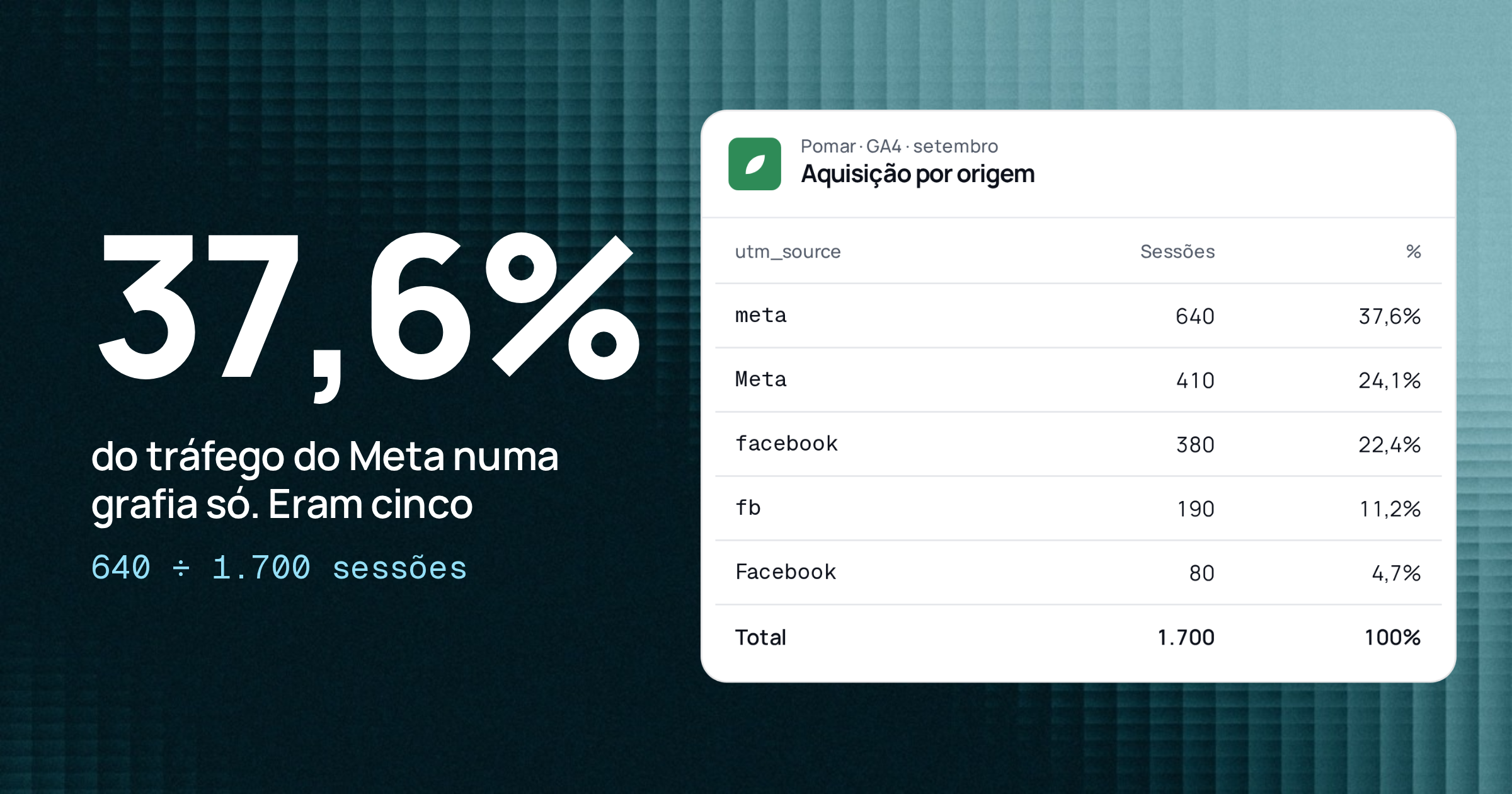
In practice, what breaks the report is the new team member, the freelancer or the email tool that writes the source its own way. A hypothetical example: a store gets 1,700 sessions from Meta Ads in a month, but each person used a different spelling.
meta
- Sessions (hypothetical)
- 640
- Share of total
- 37.6%
Meta
- Sessions (hypothetical)
- 410
- Share of total
- 24.1%
facebook
- Sessions (hypothetical)
- 380
- Share of total
- 22.4%
fb
- Sessions (hypothetical)
- 190
- Share of total
- 11.2%
Facebook
- Sessions (hypothetical)
- 80
- Share of total
- 4.7%
Total
- Sessions (hypothetical)
- 1,700
- Share of total
- 100%
utm_source value | Sessions (hypothetical) | Share of total |
|---|---|---|
| meta | 640 | 37.6% |
| Meta | 410 | 24.1% |
| 380 | 22.4% | |
| fb | 190 | 11.2% |
| 80 | 4.7% | |
| Total | 1,700 | 100% |
The math: 640 + 410 + 380 + 190 + 80 = 1,700. The largest row has 640 ÷ 1,700 = 37.6% of the traffic. Anyone who reads only the first row thinks Meta brought a bit more than a third of what it actually brought, and the CPA per source comes out wrong in all five rows.
Three required parameters, the rest is optional
GA4 recognizes several campaign parameters: utm_id, utm_source, utm_medium, utm_campaign, utm_source_platform, utm_term, utm_content, utm_creative_format and utm_marketing_tactic. The official recommendation, however, is short: when you add parameters to a URL, always use utm_source, utm_medium and utm_campaign. The other two classics, utm_term and utm_content, are optional.
The fewer parameters you require, the easier it is to comply. A team of five does not need all nine. Start with four: the three required ones plus utm_content to tell ads apart. Add the others only when someone truly needs the report they feed.
One rule per parameter
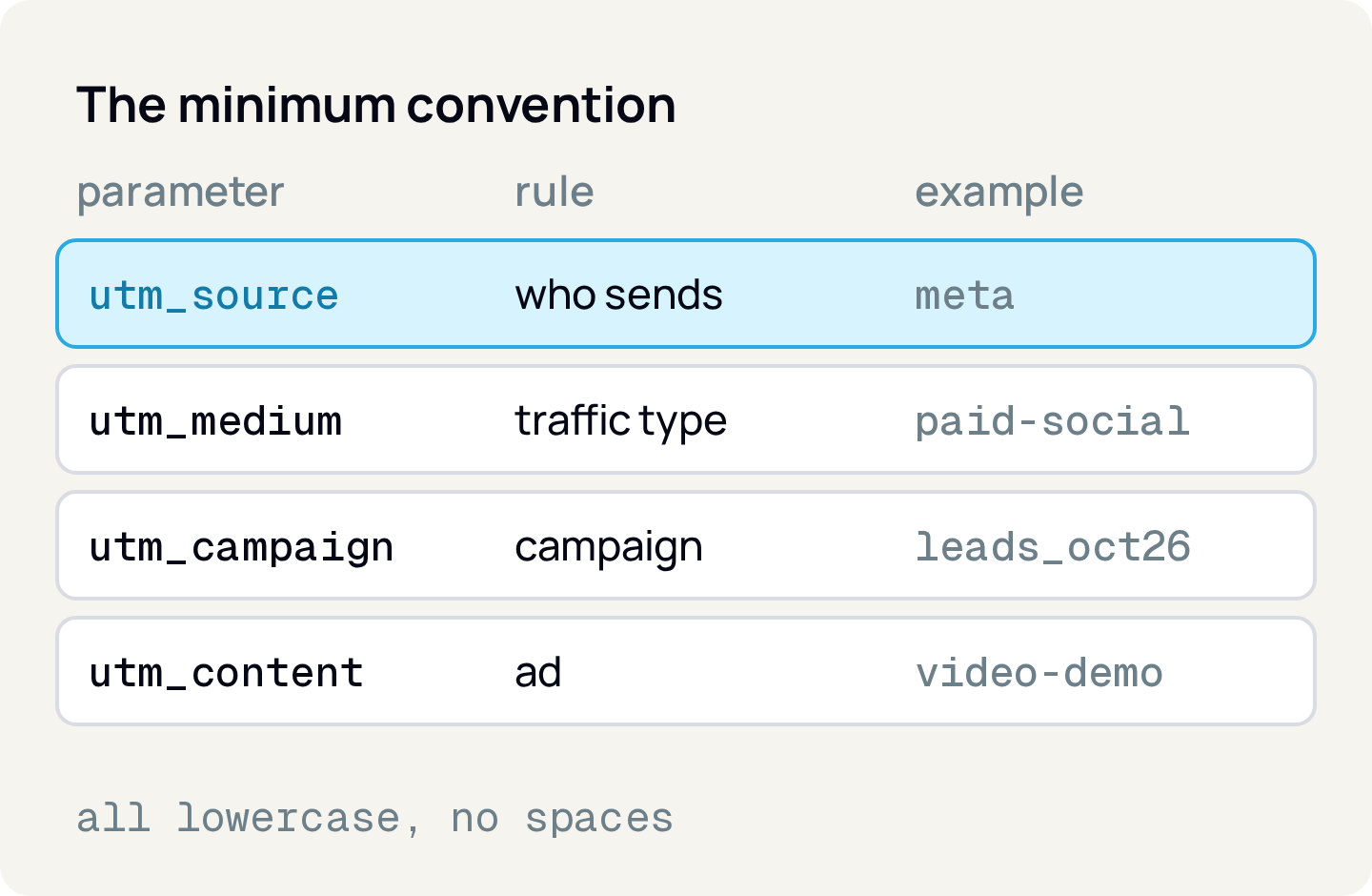
The convention below is a working suggestion, not a GA4 rule. What matters is that it is unique and written down where everyone can find it.
utm_source: who sends the traffic
One spelling per source, in a closed list: meta, google, newsletter, linkedin. If someone proposes a new source, it goes into the list before it goes into a URL. Choose meta or facebook once and always use the same one.
utm_medium: the type of traffic
Also a closed list, with few values: for example cpc for paid search, paid-social for paid social media, email, display. The reason to be strict goes beyond tidiness: GA4 groups traffic into channels (Paid Search, Paid Social, Email, Display, Direct and others) by rules on source and medium. Those definitions are not case sensitive and cannot be edited, and traffic that matches no rule lands in "Unassigned". An invented utm_medium (paid-media-2, banner-top) can leave the campaign outside the channel you expected. Check the values on your list against the official channel definitions page before you lock it.
utm_campaign: the campaign
Here a fixed format helps, one that identifies the campaign without opening the ad manager. A suggestion: goal_offer_monthYear, such as leads_courses_oct26. Use an underscore between fields and a hyphen inside a single field. The full taxonomy of campaign names is another topic; the point here is that the UTM value is predictable.
utm_content: the ad
It separates variations inside a campaign: video-demo, carousel-price. Keep the vocabulary short and repeatable, so the same creative name shows up the same way across different campaigns.
General rules
- Lowercase only.
- No spaces and no accents (a space becomes
%20in the URL and almost always becomes confusion). - Hyphen inside compound words, underscore between fields.
- No personal data in UTMs (name, email, phone). The URL shows up in logs, reports and third-party tools.
What Google Ads auto-tagging already covers
In Google Ads, auto-tagging adds a parameter called gclid (Google Click Identifier) to the URLs people click through. According to Google Ads help, it is on by default for new accounts.
The point that matters for the convention is in the Analytics documentation: when you use manual tagging and auto-tagging together, source, medium and the other traffic-classification dimensions use the auto-tagging values. The manual values of utm_content and utm_term remain available in the "Manual Ad Content" and "Manual Term" dimensions.
Two practical consequences:
- 1.For GA4 reports,
sourceandmediumUTMs on Google Ads ads are redundant while auto-tagging is on. Don't spend energy keeping them up to date, and don't turn auto-tagging off to "force" your convention. - 2.If you still want UTMs on those ads (for example, because another tool reads those parameters from the URL), use the same values from the list. What must not happen is Google Ads having
utm_source=googleandutm_source=Googlein different campaigns.
The convention weighs more on sources that have no equivalent click identifier in your reports: Meta Ads, email, newsletters, partners, QR codes and social media posts.
In Meta Ads, the name becomes data
Meta has dynamic URL parameters: values the platform fills in for you instead of you typing them one by one. The current list and syntax are in the official specification (link in Sources), and that is where you should check before building your template, because the platform changes.
What this means for the convention, regardless of the exact names: if the UTM can be filled with the name of what you created in the ad manager, the mess in the names goes straight into the report. In that case, the naming standard inside the ad manager becomes your UTM standard, and it is worth having one rule for both.
Validate before launch
A convention that depends on goodwill doesn't last a week. The validation must be mechanical, and there are two cheap ways.
Builder spreadsheet. A spreadsheet where utm_source and utm_medium are dropdowns and the final URL is built by formula. Whoever launches the campaign pastes the finished link and does not type parameters.
Automatic check. A simple validator, run in the upload script or in a weekly review of URLs, rejects what does not follow the format. An example:
const SOURCES = ['meta', 'google', 'newsletter', 'linkedin'] as const
const MEDIUMS = ['cpc', 'paid-social', 'email', 'display'] as const
const FORMAT = /^[a-z0-9]+([-_][a-z0-9]+)*$/

function validateUtm(url: string) {
  const p = new URL(url).searchParams
  const source = p.get('utm_source') ?? ''
  const medium = p.get('utm_medium') ?? ''
  const campaign = p.get('utm_campaign') ?? ''
  const errors: string[] = []
  if (!SOURCES.includes(source as never)) errors.push('utm_source not on the list')
  if (!MEDIUMS.includes(medium as never)) errors.push('utm_medium not on the list')
  if (!FORMAT.test(campaign)) errors.push('utm_campaign wrong format')
  return errors
}
The code is a sketch: what matters is that the list and the format live in a single place, not in each person's head.
How to apply
- 1.List the sources you really use and pick one spelling for each. That is your
utm_sourcelist. - 2.Define 4 to 6
utm_mediumvalues and check each one on the official GA4 channel definitions page. - 3.Choose the format of
utm_campaignandutm_contentand write two real examples next to the rules. - 4.Keep Google Ads auto-tagging on and decide whether to put UTMs on those ads; if you do, use the same values from the list.
- 5.Build the spreadsheet with dropdowns or the validator, and make passing through it mandatory before launch.
- 6.In the GA4 source and medium report, once a week check whether a value outside the list showed up (
Meta,fb,facebook). If so, find out who created it and fix the source. - 7.Keep the convention in a single document, with an owner and a review date.
Sources
All checked on October 7, 2026.
- Google Analytics, Campaign URL parameters in GA4: supported parameters, the three required ones and case sensitivity.
- Google Analytics, Best practices for creating custom campaigns:
utm_termandutm_contentoptional; "Analytics is case sensitive". - Google Analytics, Benefits of Google Ads auto-tagging: precedence of auto-tagging values over manual ones.
- Google Ads, About auto-tagging: the
gclidparameter and auto-tagging on by default for new accounts. - Google Analytics, Traffic-source dimensions: default channel group definitions (not case sensitive, not editable, "Unassigned").
- Meta, Specifications for URL dynamic parameters: official page for dynamic URL parameters.
About the author
João Vitor Moitinho
João Vitor Moitinho is the founder of Relator Digital. A computer engineer, he works on growth, measurement and martech, and writes here about what he learns building reports for performance agencies.
João Vitor Moitinho on LinkedInThis article is also available as Markdown, for agents and LLMs: view .md version