AI-ready marketing data: what to fix before you ask
Campaign names, UTMs, one definition per conversion, currency, time zone and a linked CRM. The checklist that keeps AI from being confidently wrong.


Contents
An AI only answers well about your marketing data if that data is already organized: campaigns with standardized names, complete UTMs, a single definition for each conversion, a known currency and time zone for every account, and ad spend linked to CRM revenue. Without that, ChatGPT, Claude or your dashboard's copilot adds up what it shouldn't, mixes up "lead" and "sale," and hands you an answer that is well written and wrong.
The AI doesn't know your data is messy
A language model treats what it receives as truth. If a campaign is called BF_Remarketing in November and blackfriday-rmkt in December, those are two campaigns to it. If Meta Ads counts a lead when someone submits a form and the CRM counts a lead when a new contact is created, it adds both and calls the total "leads." If the question is vague, it makes an assumption without telling you.
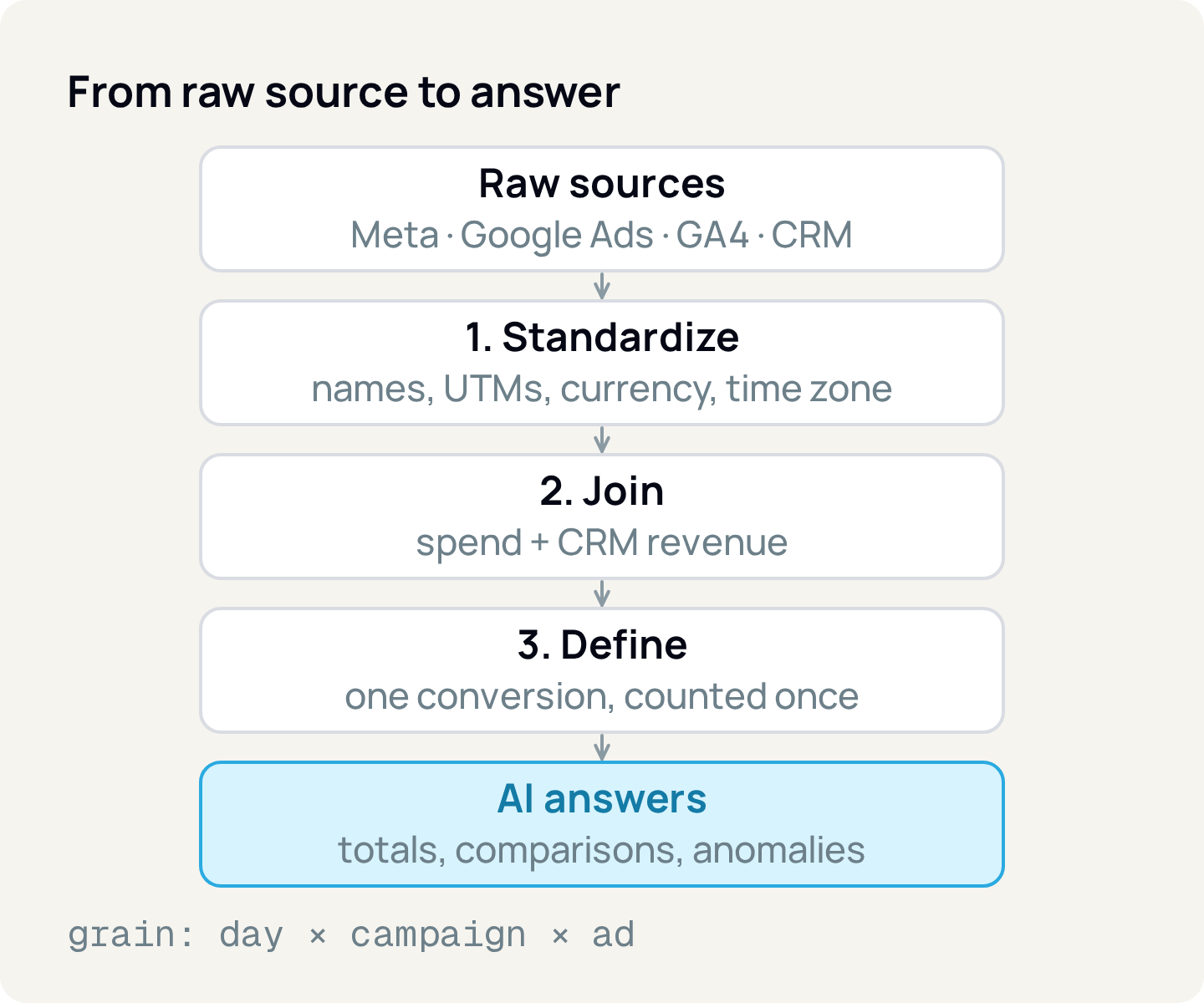
That's why the work starts before the question, in three steps: standardize, join and define.
Give every campaign a name a machine can read
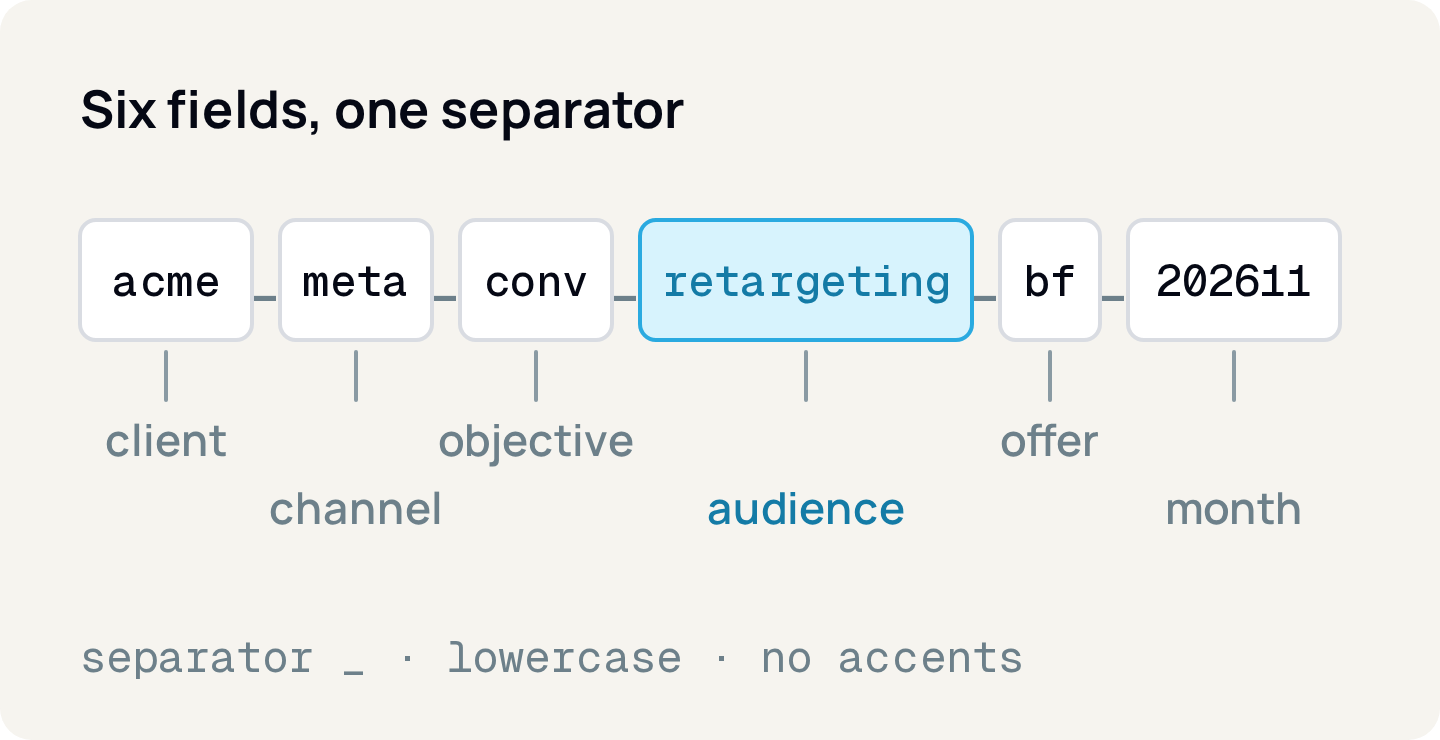
The campaign name is the only field you control on every platform, and it's how the AI understands what each row is. A good convention has fields in a fixed order, a single separator (_, for example), everything in lowercase, no accents and no spaces, and a closed vocabulary for each field.
Channel
- Allowed values (example)
meta,gads,tiktok
Objective
- Allowed values (example)
conv,lead,traffic,reach
Audience
- Allowed values (example)
prospec,retargeting,base
Month
- Allowed values (example)
YYYYMM, such as202611
| Field | Allowed values (example) |
|---|---|
| Channel | meta, gads, tiktok |
| Objective | conv, lead, traffic, reach |
| Audience | prospec, retargeting, base |
| Month | YYYYMM, such as 202611 |
With this convention, "how much did we spend on retargeting this quarter?" becomes a filter on the audience field. Without it, the AI has to guess that RMKT, Retarget and retargeting_v2 are the same thing. Keep the vocabulary in a document the whole team uses.
Close the UTM gaps, because GA4 doesn't forgive holes
UTMs are the parameters you add to the ad link so Google Analytics 4 (GA4) knows where the visit came from. GA4 recommends always using utm_source, utm_medium and utm_campaign; anything missing shows up as (not set). Values are case sensitive: utm_source=Facebook and utm_source=facebook become two sources.
utm_medium also decides the channel. In GA4's default channel group, traffic only lands in Paid Social or Paid Search if the medium matches the rule ^(.*cp.*|ppc|retargeting|paid.*)$. An ad tagged utm_medium=social falls outside the paid channel, and the question "how much did paid social bring in?" comes back with a smaller number than the real one.
Three situations break UTMs often:
- Google Ads with auto-tagging. The click gets a
gclid(Google's click identifier). Withgclidand UTMs together, GA4 uses the auto-tagged values for source, medium and campaign, with no option to reverse it; only manualutm_contentandutm_termshow up, in their own dimensions. The name that counts in GA4 is the campaign name inside Google Ads. - Meta Ads without parameters. Fill in the ad's URL parameters field with Meta's dynamic parameters, such as
{{campaign.name}},{{campaign.id}},{{adset.name}}and{{ad.name}}. Some advertisers report that Meta appends ID-based UTMs when an ad has none, but we found no stable official documentation of this. Don't rely on that behavior. - Renaming a campaign mid-month. The name changes, the UTM changes and the history splits in two. Also use
utm_idwith the campaign ID: the ID doesn't change when someone renames the campaign.
One conversion, one definition, counted once
"Lead" is the most dangerous word in a report. Each system counts something different, and the AI has no way of knowing which one you meant.
Meta Ads
- What is usually counted as a "lead"
- Form submission event fired by the pixel or the Conversions API
GA4
- What is usually counted as a "lead"
- Event marked as a key event, for example
generate_lead
CRM
- What is usually counted as a "lead"
- New contact created, after merging duplicates
| Where | What is usually counted as a "lead" |
|---|---|
| Meta Ads | Form submission event fired by the pixel or the Conversions API |
| GA4 | Event marked as a key event, for example generate_lead |
| CRM | New contact created, after merging duplicates |
Choose a definition for each funnel stage (lead, opportunity, sale) and the source for each one. In GA4, what used to be called a "conversion" is now a "key event."
Then remove double counting. If the site sends the same event through the Meta pixel and the Conversions API (the server-side feed), Meta only removes the duplicate when the pixel's eventID matches the server's event_id and the event name matches too, and only within 48 hours of the first one received. Without that ID, one sale can be counted twice. In the CRM, the same person who filled in three forms should be one contact, not three.
The attribution window is part of the definition too. Since January 12, 2026, Meta's Ads Insights API no longer returns the 7-day and 28-day view-through windows; 1-, 7- and 28-day click and 1-day view remain. If your history used 7-day view, old and new numbers aren't comparable without adjustment.
Choose the grain and don't mix granularities
Grain is the level of detail of each row. For paid media, a good default is one row per day × campaign × ad set × ad, with spend, impressions, clicks and conversions. From there you sum up to week, month or campaign.
The catch is in metrics that don't add up. Daily reach and daily unique users can't be summed into monthly reach, because the same person shows up on several days. If the data only has daily reach, the AI will add it up and give you an inflated monthly reach. Store unique metrics at the grain they'll be read at, or make it clear they don't exist at other grains.
Write down each account's currency and time zone
Currency and time zone look like details until the AI adds dollars to reais. Each platform handles them differently:
- Google Ads: time zone and currency are set when the account is created and can't be changed. To change them, you have to create another account.
- Meta Ads: changing currency or time zone creates a new ad account; the old one is closed and its ads stop running.
- GA4: changing the property's time zone only applies going forward and can create a dip or a spike on the day of the change. Changing the currency also converts historical data, and transactions in another currency are converted at the previous day's exchange rate.
A hypothetical example: a Meta account billed in dollars spent US$ 1,000 in the month, and a Google Ads account in Brazilian reais spent R$ 5,000. Adding them gives "6,000" of nothing. At a hypothetical rate of R$ 5.40 per dollar, the correct total is R$ 5,400 + R$ 5,000 = R$ 10,400. Convert before joining and record the rate you used. Time zones work the same way: an account on Pacific time and a GA4 property on Brasília time are 4 or 5 hours apart, and late-night sales land on different days in each source.
Link ad spend to CRM revenue
"Which campaign brought in sales?" only has an answer if the sale carries its origin. For that, the site form needs to save the UTMs and click identifiers (gclid, fbclid) to the CRM contact in hidden fields. When the deal is won, the revenue stays linked to the campaign. The same gclid lets you import the sale back into Google Ads as an offline conversion.
A hypothetical example: an account spends R$ 20,000 in the month and the CRM records 12 won deals from those campaigns, totaling R$ 90,000. The real ROAS (revenue divided by spend) is 4.5, and the cost per won deal is about R$ 1,667. Without the CRM link, the AI only sees the conversion value the platform reports, which follows the platform's attribution rules, not the closed sale.
That's what Relator Digital does by default: it matches won deals in HubSpot or RD Station CRM with the campaign that brought in the lead and divides revenue by the budget spent. RelatorAI queries the same sources as the dashboards and shows, step by step, what it pulled from each one, which helps you check whether the answer used the right definition.
Ask the AI what it can answer
With the data in order, the AI reads many rows fast. It doesn't replace an experiment.
Totals and averages by period, channel or campaign
- AI answers poorly
- "Did the new creative cause the jump in sales?"
Comparisons between months or accounts
- AI answers poorly
- "How many sales would we have without ads?"
Ranking campaigns by cost per sale
- AI answers poorly
- Forecasts from a few weeks of history
Out-of-pattern days (unusual spend or CPA)
- AI answers poorly
- Anything that isn't in the data
| AI answers well | AI answers poorly |
|---|---|
| Totals and averages by period, channel or campaign | "Did the new creative cause the jump in sales?" |
| Comparisons between months or accounts | "How many sales would we have without ads?" |
| Ranking campaigns by cost per sale | Forecasts from a few weeks of history |
| Out-of-pattern days (unusual spend or CPA) | Anything that isn't in the data |
Causality and incrementality (how much media added beyond what would have happened without it) need a control group: a lift test, in which part of the audience doesn't see the ad. Google Ads and Meta offer these studies. Without one, the AI points to correlation, not effect.
Turn the vague question into an answerable one
The same data gives very different answers depending on the question. Here's an ambiguous one:
Which campaign performed best last month?"Performed" can mean clicks, leads, sales or revenue. "Last month" depends on the time zone. "Campaign" may include one that spent R$ 30. The clarified version closes each gap:
Among client X's Meta Ads and Google Ads campaigns,
from September 1 to 30, 2026, Brasília time,
which had the lowest cost per won deal in the CRM?
Only include campaigns with at least R$ 1,000 spent.
Show spend in reais, won deals and revenue.
It states the metric, the conversion source, the period with its time zone, the currency and the minimum filter. If you can't fill a gap, neither can the AI.
How to apply
- 1.Write the naming convention (fields, order, separator and vocabulary) and rename active campaigns all at once, at the start of a month.
- 2.Create a UTM template per platform: dynamic parameters on Meta,
utm_idwith the campaign ID, and auto-tagging on in Google Ads. - 3.List the conversions for each funnel stage with the official source for each one, and set the same
event_idin the pixel and the Conversions API. - 4.Record the currency and time zone of every ad account and GA4 property in a table, and convert everything to one currency before adding up.
- 5.Save UTMs,
gclidandfbclidin hidden form fields and carry those values through to the deal in the CRM. - 6.Before asking the AI, state the metric, source, period with time zone, currency and filter. For causality, plan a lift test.
Sources
- Google Analytics: Collect campaign data with custom URLs
- Google Analytics: Default channel groups
- Google Ads: About auto-tagging
- Google Analytics: Benefits of Google Ads auto-tagging
- Meta: Add URL parameters to your Meta ads
- Meta: Specifications for URL dynamic parameters
- Meta for Developers: Deduplicate Pixel and server events
- Meta for Developers: Ads Insights API metric availability updates (Oct. 2025)
- Google Analytics: Key events and conversions
- Google Ads: Language, number format, time zone and currency settings
- Google Ads: About your time zone setting
- Meta: Change the currency you use for Meta ads
- Google Analytics: Add a GA4 property (time zone and currency)
- Google Analytics: Currency reference
- Google Ads: Set up offline conversion imports using GCLID
- Google Ads: About Conversion Lift
About the author
João Vitor Moitinho
João Vitor Moitinho is the founder of Relator Digital. A computer engineer, he works on growth, measurement and martech, and writes here about what he learns building reports for performance agencies.
João Vitor Moitinho on LinkedInThis article is also available as Markdown, for agents and LLMs: view .md version